Point Cloud
TunnelCAD supports importing and processing 3D point cloud data for automated cross-section extraction. This eliminates the need for manual profile digitization by sampling measured tunnel geometry directly from laser scan data.
Workflow overview
The typical point cloud workflow in TunnelCAD follows these steps:
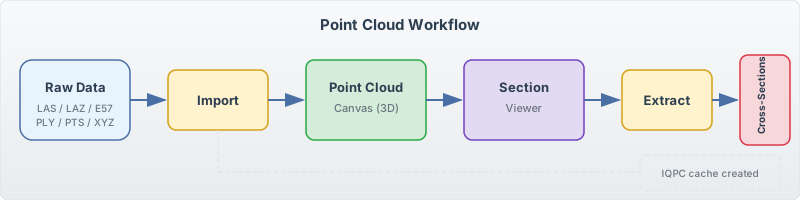
Import raw point cloud data (LAS, LAZ, E57, PLY, PTS, or XYZ format) into the project.
View the point cloud in the Point Cloud canvas tab, which renders the data using OpenGL.
Open the Section Viewer to interactively inspect point cloud slices at alignment stations.
Adjust filter parameters (angular binning, radius limits, elevation cutoffs) to isolate the tunnel surface.
Extract the filtered points into measured cross-section line data at one or more stations.
The extracted sections join the tunnel’s cross-section list and can be used for volume calculations, clearance analysis, and reporting.
Supported formats
Format |
Extension |
Description |
|---|---|---|
LAS |
|
ASPRS LIDAR data exchange standard |
LAZ |
|
Compressed LAS (requires liblaszip library) |
E57 |
|
ASTM E2807 standard for 3D imaging data |
PLY |
|
Polygon File Format – simple vertex data |
PTS |
|
Leica point cloud format (text: X Y Z Intensity R G B) |
XYZ |
|
Plain text format (X Y Z per line, optionally with RGB) |
IQPC cached format
When you import a raw point cloud, TunnelCAD converts it to the IQPC (IQsoft Point Cloud) format – an optimized binary representation with a spatial octree index. The IQPC file is cached alongside the project and reloaded on subsequent sessions without re-parsing the original file. This makes repeated work on the same dataset substantially faster.
IQPC files can also be shared between projects via Point Cloud > Attach (.iqpc)….
Point Cloud canvas tab
The Point Cloud tab in the main canvas area renders all loaded point clouds in 3D using OpenGL. You can orbit, pan, and zoom to inspect the data before opening the Section Viewer for extraction.
Note
On Linux, point cloud import requires two shared libraries in the application directory:
libE57CWrapper.so– for E57 format supportliblaszip.so– for LAZ compressed format support
These are not needed on Windows, where the equivalent DLLs are bundled with the application.